Skip to content
MS Cloud Support

Microsoft 365 · Azure · Security

Know what to fix.
See the evidence.

Understand your Microsoft 365 security posture, then take the next step with confidence. Use the assessment yourself, or work directly with the engineer who manages your cloud.

  • Read-only access
  • No card required
  • Prices published

Need Microsoft 365 or Azure managed services? Explore our services.

A steel jeweller's loupe with a cobalt ring resting on a sheet of grid paper, on a stone plinth
Sample finding
Critical priorityIAM-001 · Identity

Require multi-factor authentication for all users

A finding should explain the evidence behind it, and where that evidence stops.

  • Inspect the evidence

    Review the policy configuration and confidence behind each verdict.

  • Understand the next step

    See remediation guidance and the permissions a change would require.

  • Stay in control

    The assessment cannot change your tenant. Managed changes need agreed scope and authorization.

Explore the real dashboard

Illustrative presentation of a catalogue control. Your results depend on your configuration, licences and available evidence.

Founder-led
One engineer, first call to monthly report
101 controls
Assessment catalogue; measured coverage depends on available evidence
Evidence first
Unavailable or unmeasured controls stay clearly identified
Prices published
Per user or per tenant, no sales call required

Choose the support you need

Clarity on your own. Expertise when you need it.

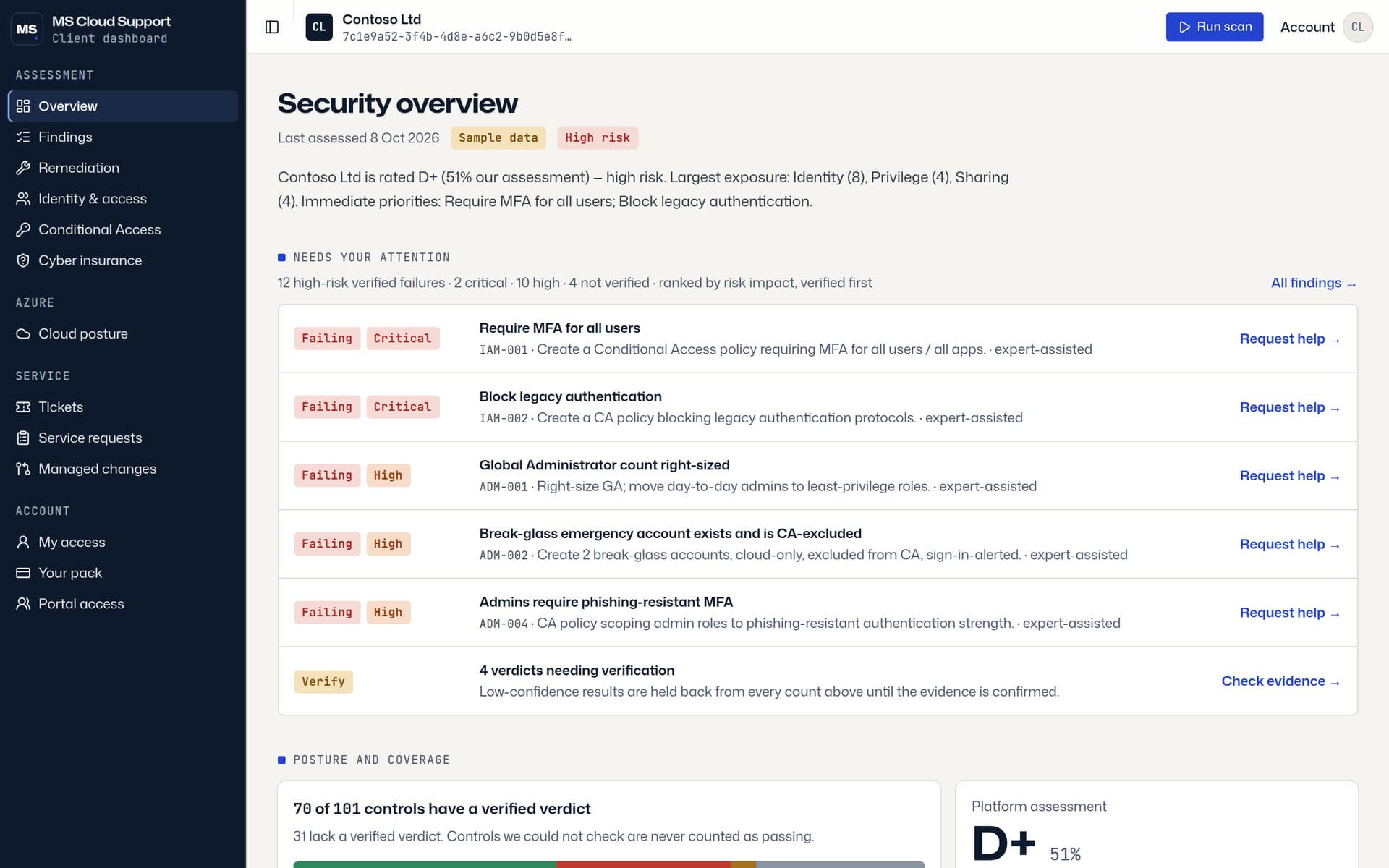
The client dashboard overview on the Contoso sample tenant: the security summary and the verified failures to fix first

The product

Security assessment & dashboard

Connect Microsoft 365 with read-only consent. Explore findings, evidence, coverage and priorities. Keep tracking posture with the Basic pack.

Free assessment · Basic pack $99 / tenant / month

15-day trial. Pack activation is currently arranged by invoice.

Explore the dashboard pack
A precision dial test indicator on a stone plinth, its needle resting at zero

The service

Managed Microsoft cloud services

Work directly with your engineer on Microsoft 365, Azure, migrations, security and day-to-day operations. Agree the service boundaries before work begins.

From $89 / user / month

10-user minimum. Onboarding and Microsoft licences are separate.

Compare managed services

The assessment catalogue

101 controls. Each one explained.

Identity, email, Teams, sharing, Defender, devices and more. The free assessment reads your tenant with read-only consent. Every result includes its evidence and confidence.

Measured coverage depends on your licences and the evidence available. Unavailable or uncertain controls are distinguished from confirmed failures.

Identity · 17
Privilege · 11
Email · 12
Defender · 8
Sharing · 10
Teams · 12
Data · 8
Application · 7
Power Platform · 9
Device · 4
Logging · 3

101 controls · 11 domains

Point at a cell, or tab in and use the arrow keys, to read the control it checks.

  • verified
  • needs evidence
  • at risk
  • not measured
List all 101 controls

Identity

  • IAM-001 Require MFA for all users
  • IAM-002 Block legacy authentication
  • IAM-003 MFA registered for all active users
  • IAM-004 Security Defaults OR Conditional Access in force
  • IAM-005 Sign-in risk policy enabled
  • IAM-006 User risk policy enabled
  • IAM-007 High-risk users are blocked or remediated
  • IAM-008 Phishing-resistant MFA available/enforced for all users
  • IAM-009 SMS/Voice is not an allowed primary MFA method
  • IAM-010 Microsoft Authenticator shows login context (number matching)
  • IAM-011 Migrated off legacy per-user MFA to the Authentication Methods policy
  • IAM-012 Cloud account password expiration disabled
  • IAM-013 Guest sign-ins require MFA
  • IAM-014 Self-service password reset with strong verification
  • IAM-015 Device registration/join requires MFA
  • IAM-016 Device code authentication flow blocked
  • IAM-017 Admin notification on high-risk users

Privilege

  • ADM-001 Global Administrator count right-sized
  • ADM-002 Break-glass emergency account exists and is CA-excluded
  • ADM-003 Privileged roles are PIM-eligible, not permanently active
  • ADM-004 Admins require phishing-resistant MFA
  • ADM-005 Privileged users are cloud-only accounts
  • ADM-006 Privileged role activation requires approval
  • ADM-007 Privileged role activation/assignment alerting
  • ADM-008 Access reviews for privileged roles and guests
  • ADM-009 Privileged role provisioning restricted to PIM/PAM
  • ADM-010 Alert on Global Administrator activation
  • ADM-011 Privileged users use finer-grained roles instead of Global Administrator

Email

  • EXO-001 External mailbox auto-forwarding blocked
  • EXO-002 SPF record published
  • EXO-003 DKIM signing enabled for all domains
  • EXO-004 DMARC record published
  • EXO-005 DMARC policy enforced (p=reject)
  • EXO-006 SMTP AUTH disabled tenant-wide
  • EXO-007 Mailbox auditing enabled
  • EXO-008 External sender identification enabled
  • EXO-009 Connector/IP allow-list not used to bypass filtering
  • EXO-010 Additional storage providers disabled in Outlook on the web
  • EXO-011 Contact folders not shared with all domains
  • EXO-012 Calendar details not shared with all domains

Defender

  • DEF-001 Microsoft Secure Score baseline
  • DEF-002 Preset security policies (Standard or Strict) enabled
  • DEF-003 Safe Attachments enabled
  • DEF-004 Safe Links enabled
  • DEF-005 Anti-phishing impersonation protection configured
  • DEF-006 Common attachment / malware filter configured
  • DEF-007 Security alerts enabled
  • DEF-008 Security alerts routed to a monitored address / SIEM

Sharing

  • SHR-001 External sharing not set to "Anyone
  • SHR-002 Guest access restrictions configured
  • SHR-003 '"Anyone" link expiration and permission limited'
  • SHR-004 Default sharing link scope is specific people
  • SHR-005 Reauthentication required for external users
  • SHR-006 SharePoint custom scripts disabled
  • SHR-009 OneDrive external sharing limited
  • SHR-010 Default file/folder sharing permission is view-only
  • SHR-011 '"Anyone" link permission is view-only'
  • SHR-012 Guest invitations restricted to inviters

Teams

  • TMS-001 External access (federation) restricted
  • TMS-002 Contact with unmanaged / Skype consumer users blocked
  • TMS-003 Anonymous users cannot start meetings
  • TMS-004 Meeting lobby admits authenticated users only
  • TMS-005 Third-party and custom app usage governed
  • TMS-006 Teams email integration disabled
  • TMS-007 External participants cannot request control of shared desktop
  • TMS-008 Internal users cannot initiate contact with unmanaged users
  • TMS-009 Only agency-approved Microsoft apps installable
  • TMS-010 Meeting recording restricted
  • TMS-011 Dial-in (PSTN) users cannot bypass the meeting lobby
  • TMS-012 Live events are not forced to always record

Data

  • DLP-001 DLP policies protect sensitive information
  • DLP-002 Sensitivity labels published
  • DLP-003 Retention policy configured
  • DLP-004 Custom DLP policy scoped to Exchange, OneDrive, SharePoint, Teams, and Devices
  • DLP-005 DLP policy blocks sharing sensitive information with everyone
  • DLP-006 DLP policy notifies and educates users
  • DLP-007 Restricted-apps list defined for endpoint DLP
  • DLP-008 Endpoint DLP blocks restricted apps and unwanted Bluetooth transfers

Application

  • APP-001 User consent to apps restricted
  • APP-002 No over-privileged / illicit OAuth grants
  • APP-003 Admin consent request workflow enabled
  • APP-004 Group owner consent restricted
  • APP-005 App registration restricted to admins
  • APP-006 No stale or long-lived app credentials
  • APP-007 Application password (secret) credential addition blocked

Power Platform

  • PWR-001 Environment creation restricted to admins
  • PWR-002 Trial environment creation restricted
  • PWR-003 DLP policy on the default environment
  • PWR-004 Power Platform tenant isolation enabled
  • PWR-005 Non-default environments covered by a DLP policy
  • PWR-006 Power Platform connection allow-list configured
  • PWR-007 Content Security Policy enforced for Power Apps
  • PWR-008 Power Pages site creation restricted to admins
  • PWR-009 Share with Everyone disabled in Power Apps

Device

  • DEV-001 Intune compliance policies exist
  • DEV-002 Conditional Access requires a compliant / hybrid-joined device
  • DEV-003 Disk encryption (BitLocker/FileVault) enforced
  • DEV-004 Mobile app protection (MAM) policies configured

Logging

  • LOG-001 Unified audit log enabled
  • LOG-002 Sign-in and audit logs exported to durable storage / SIEM
  • LOG-003 Audit log retention adequate

Work delivered

What we have done for SMB clients

Real engagements, described without naming the client. References are available on a call; client quotes will appear here as each one agrees to be quoted.

  1. Professional services

    On-premises to Microsoft 365 and Azure migration

    Moved email, files and workloads from on-premises architecture into Microsoft 365 and Azure for SMB clients, with the identity and security baseline set up alongside.

    How we run it

    • Discovery and sizing before any wave is planned
    • Pilot wave validated, then cutover windows with rollback steps
    • Handover documentation the client can operate without us
    • Exchange Online
    • SharePoint & OneDrive
    • Azure landing zone
    • Entra ID
  2. Security & compliance

    Security audit, monitoring and custom security configuration

    Audited Microsoft 365 tenants, set up monitoring, and implemented client-specific security configuration rather than a one-size baseline.

    How we run it

    • Read-only assessment first, findings with evidence
    • Changes applied under change control, one at a time
    • Monthly posture report tracking what moved
    • Conditional Access
    • Defender
    • Intune
    • Secure Score
  3. AI automation

    AI automation for repetitive IT tasks

    Set up and configured AI-assisted automation for repetitive tasks in SMB environments, so routine requests stop consuming engineer time.

    How we run it

    • Ticket and task review to find the repetitive work first
    • Working workflows with documented triggers and owners
    • A runbook per automation so it can be maintained without us
    • n8n
    • Microsoft Graph
    • AI assistants
    • Ticketing
A steel vernier caliper and a cobalt mechanical pencil on a folded sheet of drafting paper

Founder-led

The engineer on the first call does the work.

You work directly with Soumyadeep Sarkar, the engineer who owns your tenant: the same person on the first call, the migration weekend and the monthly report.

Delivery is remote-first from India, aligned to your business hours, with on-site work arranged as an add-on. Every engagement ends with runbooks you can operate without us.

FAQ

Answers, without the fluff

If you have a specific environment, we'll map the best approach on the call.

No. Packages cover services and support. Microsoft licensing and third‑party tooling (if needed) are billed separately.

Next step

Want a second pair of eyes on your tenant?

Run the free read-only assessment yourself, or book a 30-minute call with the engineer who would do the work.

MS Cloud Support — Microsoft 365 & Azure services for SMBs